Building a website is only the beginning. Like any valuable asset, a website needs ongoing care to stay fast, secure and effective — and the businesses that neglect this often learn the hard way when their site slows to a crawl, breaks, or gets hacked. Website maintenance is the unglamorous but essential work that protects your investment and keeps it performing. This complete guide explains what maintenance involves, why it matters so much, and how to keep your website healthy long after launch.
What Website Maintenance Is
Website maintenance is the ongoing work of keeping a website secure, up to date, fast and functional after it goes live. It covers a range of routine tasks: updating the software, themes and plugins the site runs on; taking regular backups; monitoring for security threats and downtime; fixing bugs and broken links; keeping content current; and maintaining performance. Think of it like servicing a vehicle — a website that’s regularly maintained runs reliably for years, while one that’s ignored gradually develops problems that become expensive to fix. Maintenance isn’t optional upkeep for a serious business website; it’s what keeps the asset working.
Why Maintenance Matters
A website is central to how customers find, judge and contact your business, so its health directly affects your reputation and results. Regular maintenance keeps it secure against the constant threat of hacks, fast enough to keep visitors and rankings, and free of the broken links and errors that frustrate customers and cost you leads. It also protects you from disaster: reliable backups mean that if something does go wrong, you can recover quickly rather than losing everything. In short, maintenance protects both the money you invested in your site and the business it generates — a small ongoing cost that prevents much larger ones.
What Happens Without It
Neglected websites don’t stay the same — they degrade, often invisibly until something breaks badly. Outdated software becomes a security hole that hackers exploit through automated attacks, which is how most small business sites get hacked. Performance slowly declines, hurting both user experience and search rankings. Broken links, errors and outdated information accumulate, undermining credibility. And without backups, a single problem — a hack, a failed update, a server issue — can wipe out the site entirely. Recovering from a hacked or broken unmaintained site is stressful and expensive, and the lost business and reputation during downtime often costs far more than years of maintenance would have.
Software & Plugin Updates
Websites are built on software — a content management system like WordPress, plus themes and plugins — and this software is updated regularly to fix bugs, add features and, crucially, patch security vulnerabilities. Applying these updates promptly is one of the most important maintenance tasks, because outdated plugins and themes are the single most common way websites get hacked. But updates must be done carefully: occasionally an update can conflict with something and cause issues, which is why updates should ideally be tested and always preceded by a backup. Staying current, safely, keeps your site both secure and running smoothly.
Security & Malware Protection
Website security is an ongoing effort, not a one-time setup. Beyond keeping software updated, good maintenance includes strong access controls (secure passwords and two-factor authentication), a firewall or security plugin to block attacks, regular malware scanning, and prompt response to any threats. Automated bots constantly probe websites for weaknesses, so even small business sites are targets. Proactive security maintenance dramatically reduces the risk of a hack, and if one is attempted, catches it early. Our website security checklist lists the essential protections every business site should have in place and maintained.
Backups & Disaster Recovery
Backups are your safety net, and they matter more than almost anything else in maintenance. A backup is a saved copy of your website’s files and database that lets you restore the site if something goes wrong — a hack, a bad update, a server failure or human error. Good backup practice means automated, regular backups stored off-site (not just on the same server, which is useless if that server fails), and occasionally testing that backups actually restore. With reliable backups, almost any disaster becomes a quick recovery rather than a catastrophe. Our guide to how backups work explains what to look for.
Performance & Speed
Websites tend to slow down over time as content, images, plugins and data accumulate — and since speed affects both rankings and conversions, maintaining performance matters. Ongoing performance maintenance includes optimising images, cleaning up unnecessary data and plugins, ensuring caching works, and monitoring Core Web Vitals. A site that was fast at launch can become sluggish within a year without attention. Regular performance checks catch and fix this before it costs you visitors and rankings. Our speed optimization service addresses performance in depth, and the speed checklist covers the essentials.
Content Updates & Freshness
A website should reflect your business as it is now, not as it was when the site launched. Content maintenance means keeping information current — services, prices, team, offers, contact details — and refreshing content so it stays accurate and relevant. Outdated information (old prices, closed services, wrong hours) frustrates customers and damages trust. Fresh, current content also supports SEO, as search engines favour sites that are actively maintained. Whether you update content yourself or have it handled as part of a maintenance plan, keeping your site current is a simple but important part of looking professional and trustworthy.
Uptime & Monitoring
Your website needs to be available whenever customers look for you, so monitoring for downtime is an important maintenance function. Uptime monitoring automatically checks that your site is online and alerts you (or your maintenance provider) the moment it goes down, so problems can be fixed quickly rather than discovered days later after lost business. Monitoring can also catch performance drops, errors and security issues early. Downtime is invisible until someone notices — often a customer who then goes to a competitor — so proactive monitoring protects both revenue and reputation by ensuring issues are caught and resolved fast.
Maintenance & SEO
Website maintenance and SEO are closely connected, because many maintenance tasks directly support rankings. Fast performance, security (HTTPS and a clean, un-hacked site), no broken links, fresh content and reliable uptime are all things Google rewards — and all outcomes of good maintenance. A hacked or broken site can lose rankings quickly, and a slow, neglected one gradually slips. So maintaining your website isn’t just about keeping it working; it’s about protecting the search visibility you’ve built. Businesses investing in SEO should see maintenance as part of protecting that investment, not a separate concern. Our SEO guide covers the ranking side in full.
What a Maintenance Plan Includes
A professional maintenance plan bundles the essential tasks into a managed service so you don’t have to think about them. A good plan typically includes regular software and plugin updates, automated off-site backups, security monitoring and malware protection, uptime monitoring, performance checks, broken-link fixes, content updates, and priority support when you need changes or help. Plans are usually monthly, scaled to the size and needs of your site — a simple business site needs less than a busy e-commerce store. Our website maintenance & support plans cover all of this, and our maintenance checklist shows exactly what regular upkeep involves.
DIY vs Professional Maintenance
You can maintain a website yourself if you have the time, knowledge and discipline — running updates carefully, taking backups, monitoring security and performance, and keeping content fresh. For a simple site and a technically comfortable owner, this can work. But maintenance is easy to neglect amid the demands of running a business, and mistakes (an update that breaks the site, a missed security patch, no recent backup) can be costly. A professional maintenance plan removes the burden and the risk, ensuring the work is done properly and consistently by someone who’ll also fix things fast if they go wrong. For most businesses, the peace of mind and protection are well worth the modest monthly cost.
Taking Over an Existing Website
You don’t need to have built your website with a particular company to have them maintain it. Many businesses find themselves with a site built by a developer who’s no longer available or responsive, and need someone reliable to take over its upkeep. A good maintenance provider will start with a technical audit to understand the site’s current state, address any urgent security or performance issues, and then maintain it going forward. If you have a website that no one is currently looking after — a common and risky situation — arranging proper maintenance is one of the most sensible steps you can take. We regularly take over and maintain websites built by others after a quick review.
How Often Maintenance Should Happen
Different maintenance tasks happen on different rhythms, and understanding this helps you know what good maintenance looks like. Some things need frequent attention — security monitoring and backups should be ongoing or daily, and software updates applied promptly as they’re released, since delays leave security gaps. Other tasks suit a regular schedule: performance checks, broken-link scans, and content reviews work well monthly, while deeper reviews might be quarterly. The key is that maintenance is continuous rather than something done once a year when you remember. A neglected site accumulates problems silently between the rare times anyone looks at it. A good maintenance plan builds these rhythms in automatically, so the right tasks happen at the right frequency without you having to track them.
Maintenance for E-Commerce Sites
Online stores need more intensive maintenance than standard websites, because more can go wrong and the cost of problems is higher — every hour of downtime or every broken checkout is lost sales. E-commerce maintenance includes everything a normal site needs plus extra attention to the payment system, checkout process, product and inventory data, and the integrations that keep orders flowing. Testing that the full purchase journey works should be routine, since a silent checkout failure can lose sales without you noticing. Security is even more critical given payment data is involved. For any serious online store, robust, frequent maintenance isn’t optional — it directly protects revenue. Our e-commerce guide covers the store side that this maintenance keeps running smoothly.
Maintenance for WordPress Sites
WordPress powers a huge share of websites, and because of its popularity and plugin ecosystem, it needs diligent maintenance. WordPress sites rely on the core software plus themes and plugins, all of which receive regular updates that fix bugs and, importantly, patch security holes. Outdated plugins are the most common way WordPress sites get hacked, so timely, careful updating is essential — always after a backup, since occasionally an update can conflict with something. WordPress maintenance also includes managing the plugins you use (removing unused ones, which are security risks), database upkeep, and the usual security, backup and performance work. Well-maintained, WordPress is reliable and secure; neglected, it becomes vulnerable. This is a core part of what our maintenance plans handle for WordPress sites.
The Real Cost of Downtime
When a website goes down, the costs add up faster than most owners realise. There’s the direct lost business — every enquiry, call or sale that doesn’t happen while the site is unreachable. There’s the reputation damage of customers finding your site broken, who may simply go to a competitor and not return. For sites that rank well, extended downtime can even affect search rankings. And there’s the stress and cost of emergency fixes, often at premium urgency. The frustrating part is that downtime is usually preventable through the monitoring, updates and backups that good maintenance provides. Weighed against these costs, the modest ongoing investment in maintenance is clearly worthwhile — it’s insurance against losses that can dwarf it many times over in a single serious incident.
Domain & Hosting Renewals
One of the simplest yet most damaging maintenance failures is letting your domain or hosting expire. If your domain lapses, your website and email can go down, and in the worst case someone else can register your domain — a genuine business disaster. Expired hosting takes your site offline. These renewals are easy to forget, especially when set up years ago with a card that’s since changed. Good maintenance includes tracking these renewal dates and ensuring they’re paid on time, ideally with plenty of buffer. Keeping your domain registered in your own name, with current payment details and reminders, protects one of your most important business assets. It’s a small administrative task with outsized consequences if neglected.
Maintenance Reporting
Good maintenance isn’t just work done in the background — it should be visible to you through reporting, so you know your site is being looked after and what’s been done. Useful maintenance reporting covers what updates were applied, that backups ran successfully, any security issues detected and addressed, performance and uptime status, and any fixes or changes made. This transparency gives you confidence that the ongoing investment is real and valuable, and flags anything you should know about. It also builds trust in the relationship with your maintenance provider. A provider who quietly does the work but tells you nothing leaves you unsure of the value; regular, clear reporting shows exactly what your maintenance is protecting and achieving.
Emergency Response
Even with excellent preventive maintenance, occasional emergencies happen — a site goes down, a hack is attempted, an update causes an issue — and how quickly they’re resolved makes all the difference. This is one of the biggest advantages of a professional maintenance arrangement: when something goes wrong, you have someone who knows your site, is reachable, and can respond fast to diagnose and fix it, ideally restoring from a recent backup if needed. Compare that to a site with no support, where an emergency means scrambling to find help while the site stays down and business is lost. Knowing that rapid, competent help is available when you need it — and that backups make recovery quick — is a large part of the peace of mind good maintenance provides.
A Practical Maintenance Schedule
A simple schedule keeps everything on track. Ongoing/daily: security monitoring, uptime monitoring and backups run continuously. As released: apply software, theme and plugin updates promptly, after a backup. Monthly: check performance and Core Web Vitals, scan for broken links, review and refresh content, and confirm backups are restoring properly. Quarterly: a deeper review of security, plugins in use, and overall site health, plus checking upcoming domain and hosting renewals. Annually: a broader review of whether the site still meets your needs or would benefit from improvements. Following a schedule like this — or having a maintenance plan that does it for you — keeps a website healthy, secure and effective year after year rather than degrading through neglect.
Maintenance vs Support: The Difference
People often use “maintenance” and “support” interchangeably, but they cover slightly different things, and a good plan includes both. Maintenance is the proactive, routine work that keeps your site healthy — updates, backups, security, performance and monitoring — happening on a schedule whether or not anything’s wrong. Support is the responsive help you get when you need something — a change made, a problem fixed, a question answered. Maintenance prevents problems; support helps when you have a need or an issue arises. Together they ensure your site stays healthy and you have someone to turn to. When evaluating a plan, check that it covers both the proactive upkeep and responsive help, since a plan that only does one leaves a gap. Our maintenance and support plans deliberately combine both.
Choosing a Maintenance Provider
Choosing who maintains your website matters, because you’re trusting them with an important asset and relying on them when things go wrong. Look for a provider who clearly defines what their plan includes, is responsive and reachable (especially for emergencies), has the technical competence to handle your site’s platform, provides reporting so you know the work is being done, and is transparent about pricing. Reliability and communication matter as much as technical skill — a provider who does great work but is unreachable when your site goes down isn’t much help. You don’t need to have built your site with them; a good provider can take over maintenance of an existing site after an audit. Choosing a dependable maintenance partner gives you both a healthy website and peace of mind.
Maintenance for Growing Sites
As a website grows — more pages, more traffic, more features, perhaps adding e-commerce — its maintenance needs grow too. A simple brochure site needs relatively light maintenance; a busy site with a store, many pages and integrations needs more attention to keep everything working, fast and secure. It’s worth revisiting your maintenance arrangement as your site evolves, ensuring the level of care matches the site’s current complexity and importance to your business. A growing site is usually a more valuable one, generating more business, which makes protecting it through adequate maintenance more important, not less. Matching your maintenance to your site’s current reality — rather than the simpler site it may once have been — ensures it stays reliable and effective as it and your business grow.
The Maintenance Mindset
The biggest shift that helps businesses is treating a website as a living asset that needs ongoing care, rather than a one-time project that’s “done” at launch. This maintenance mindset recognises that a website, like a vehicle or a building, needs regular upkeep to keep performing and to protect its value. Businesses with this mindset budget for maintenance from the start, keep their site healthy, and avoid the crises that hit neglected sites. Those who see the site as finished at launch often face avoidable problems later — a hack, a crash, lost data, declining performance — that cost far more than maintenance would have. Adopting the maintenance mindset, and building it into how you think about your website, is one of the simplest ways to protect and get lasting value from your investment.
More Maintenance Questions
A few more questions come up regularly. Is maintenance really necessary for a simple site? Yes — even simple sites need security updates, backups and monitoring, since neglected simple sites still get hacked or break. Can I just fix things when they break? That reactive approach usually costs more — emergencies are stressful and expensive, and some problems (like a hack with no backup) can be catastrophic. Who should maintain my site if my developer disappeared? A reliable maintenance provider can take over after an audit. Does maintenance help SEO? Yes, indirectly — speed, security, uptime and freshness all support rankings. The consistent theme is that proactive, ongoing maintenance is far cheaper and safer than dealing with the problems neglect eventually causes.
Getting Started With Maintenance
If your website currently has no maintenance in place — a surprisingly common and risky situation — getting it sorted is a sensible priority. Start by understanding your site’s current state: is it up to date, backed up, secure and monitored? If you’re not sure, that uncertainty is itself a reason to act. Then decide whether you’ll maintain it yourself with the discipline that requires, or arrange a professional maintenance plan that handles it reliably. For most businesses, a maintenance plan removes the burden and risk for a modest monthly cost, ensuring the work is done properly and help is available when needed. Whether your site was built by us or someone else, we can review it and put proper maintenance in place. Our maintenance plans keep your site fast, secure and working so you can focus on your business.
Proactive vs Reactive: A Final Word
The core choice in website maintenance comes down to proactive versus reactive. Proactive maintenance invests a little, consistently, to prevent problems — keeping the site updated, backed up, secure and monitored so issues are avoided or caught early. Reactive maintenance waits until something breaks and then scrambles to fix it, usually at greater cost, stress and disruption, and sometimes with real damage (like data lost because there was no backup). The proactive approach is almost always cheaper and safer over time, even though it feels like paying for something when nothing’s wrong. That’s exactly the point — you’re paying to keep nothing going wrong. Businesses that adopt the proactive approach avoid the crises that hit neglected sites, and enjoy a website that just keeps working. It’s the difference between servicing your car and waiting for it to break down on the highway.
Maintenance Essentials Summary
To summarise what a well-maintained website needs: regular software, theme and plugin updates applied promptly and safely; automated, off-site backups that are occasionally tested; ongoing security monitoring and protection; uptime monitoring so downtime is caught immediately; periodic performance checks to keep the site fast; broken-link and error checks; content kept current and accurate; and reliable support available when you need changes or help. Add to that keeping domain and hosting renewals current, and reporting so you know it’s all being done. Whether you handle these yourself with discipline or through a professional plan, covering these essentials keeps a website secure, fast and effective year after year. Neglecting them invites the problems that cost far more than maintenance ever would. Our maintenance plans cover all of these essentials so you don’t have to think about them.
Explore the full maintenance cluster
→ Website Maintenance & Support Service → Website Maintenance Checklist → Website Security Checklist → How Website Backups Work → Speed Optimization Service → All Complete GuidesFrequently Asked Questions
Real Projects. Real Results.
A selection of websites we have designed and built for businesses across Tamil Nadu.

Wood Crops
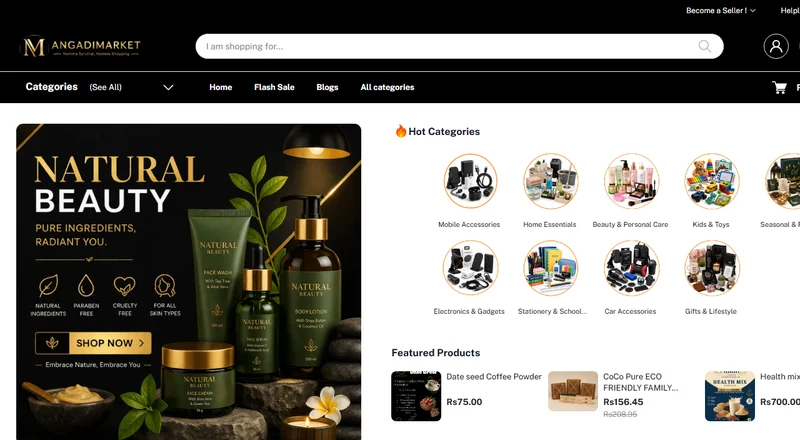
Angadi Market

Sri Rakhi Interiors

MSJ Jewellers

Grow Value Properties

Infibee
What Our Clients Say
Real stories from business owners who partnered with us for growth.
"AS Enterprises rebuilt our interior design studio website in under 2 weeks. Our enquiries and customer calls doubled within a month of launching. Their local SEO optimization works wonders!"
"Working with AS Enterprises for our fashion store was the best business decision. They developed a fast Shopify store and set up our Meta Ads. Our online sales tripled in 60 days!"
"From brand consulting to launching our digital presence, they were professional, prompt, and result-oriented. Direct developer communication saved us weeks of email exchanges."
Official Partners
Platforms and payment gateways we build with and integrate for our clients.
 G
Google Partner
G
Google Partner
 CC
CCAvenue
CC
CCAvenue
 S
Shiprocket
S
Shiprocket
 🛒
Shopify Partners
🛒
Shopify Partners
 R
Rediff
R
Rediff
 Z
Zoho
Z
Zoho
 ₹
Razorpay
₹
Razorpay
 P
PayU
P
PayU
 💬
tawk.to
💬
tawk.to
Keep Your Website Fast, Secure & Working
AS Enterprises helps Chennai businesses turn strategy into results. Get a free, no-obligation consultation.